
Lesson 1: あ い う え お
Reading
How to Read
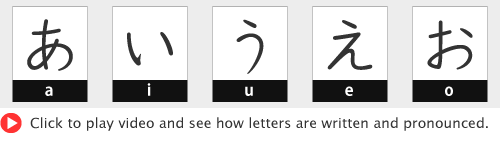
Just watch the video several times and move on. You can memorize at the Quiz programs.
あ, い, う, え and お are the first five letters of Hiragana alphabet and are placed in the first row of the 五十音図 [ gojūon-zu | Table of 50 sounds ].
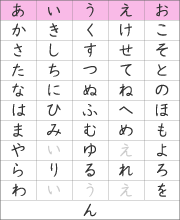
You basically read as written in ローマ字 [ rōmaji | Roman alphabet ]. But the way you usually read may be different from the sound of Japanese.
Try to imitate the pronunciation of native speakers.
Marks

| Mark | Name | Function |
|---|---|---|
| 、 | 読点 tōten | same as English comma |
| 。 | 句点 kuten | same as English period |
| 「 | かぎ括弧 kagikakko | same as English quotation mark (beginning) |
| 」 | かぎ括弧 kagikakko | same as English quotation mark (end) |
| ? | 疑問符 gimonfu | same as English question mark |
| ! | 感嘆符 kantanfu | same as English exclamation mark |
You can assume that these marks have almost the same functions as English marks.
You don't have to read out these marks.
[ 、] and [ 。] as a group are called 句読点 [ kutōten | punctuation marks ].
Quotation marks [「 ] (beginning) and [ 」] (end) have different shapes.
Vowels
Short Vowels

Long Vowels

Japanese language has five short vowels [短母音 tan-boin ] and five long vowels [長母音 chō-boin ].
あ, い, う, え and お are the five short vowels.
Long vowels ああ, いい, うう, ええ and おお are indicated by an additional short vowel letter.
A horizontal bar is also used (e.g. あー, いー, うー, えー, おー). This is not the official way but is used quite often in casual expressions.
In Rōmaji, long vowels ああ [ ā ], うう [ ū ], ええ [ ē ] and おお [ ō ] are indicated by a horizontal bar on top. いい [ ii ] is double " i ".
Quiz
How to Do
- Hiragana will be shown.
- Read out the letter when it becomes red color.
- You are good enough if you can read correctly the last 10 questions.
This program is a video file. There is no function to check your answer.
Click "YouTube" button below to subscribe our official channel. You can get information on new uploads.
Go to the Writing section.

References
Related Topics
YouTube
japanese-lesson.com official channel
Play List - all videos of Lesson 1